 LinMBC
 English
 Português (Brasil)
 Español
 Français
 Deutsch
 Русский
 Polski
 日本語
日本語 한국어
한국어 简体中文
简体中文Alpha
Your mouse buttons, a different layout for every game.
LinMBC remaps mouse buttons to keys and combos on Linux, and switches profiles by itself when you alt-tab into a game. Inspired by X-Mouse Button Control for Windows.
Free and open source · MIT · Wayland first
Mouse with side buttons? Press one up here.
What it does
A profile per game
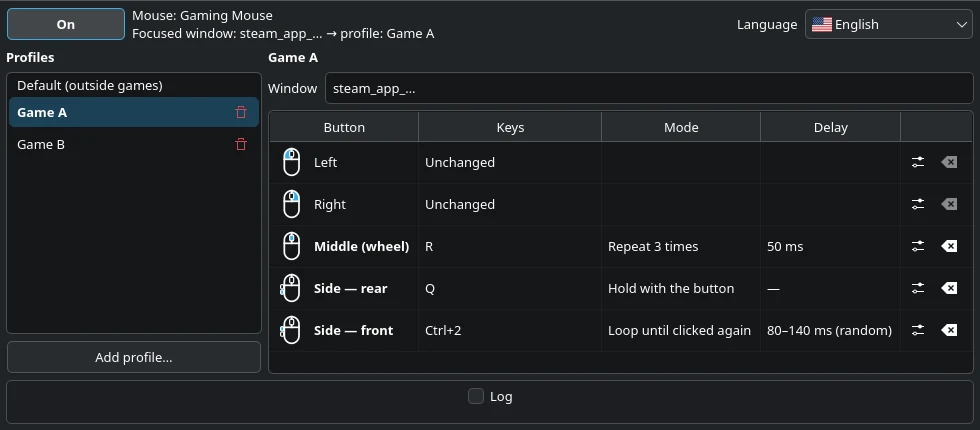
Profiles follow the focused window. Alt-tab out of the game and your buttons are back to normal: outside games the Default profile applies.
Four ways to click
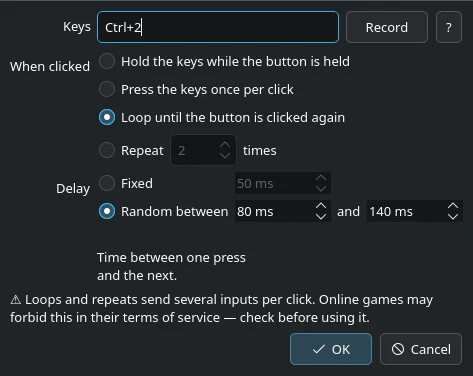
Hold the keys with the button, press them once, loop them until the next click, or repeat them N times — with a fixed or random delay.
Any key or combo
Type “Ctrl+2” or “er”, or press Record and hit the keys. Layout independent.
Your Steam library
“Add profile” lists your installed Steam games and matches the game window for you, Proton included.
Works on Wayland
It works below the compositor, so it does not depend on X11. The remapping runs as a background service and keeps working with the window closed.
Every mouse, plugged in any time
Any mouse is picked up automatically, several at once, including a receiver unplugged and plugged back.
How it works
Two small programs: a background service that does the remapping, and the window where you set it up.
- 01
Reads the mouse
The service takes the mouse events before the desktop sees them. It only ever opens mice, never keyboards.
- 02
Knows the game
On KDE Plasma, a tiny KWin script reports the focused window, and the matching profile becomes active.
- 03
Sends the keys
Remapped buttons come out of a virtual keyboard and mouse, so games see ordinary input.
- 04
Fails safe
If anything goes wrong, every mouse is released and works normally again.
Install
1Arch Linux and CachyOS
Builds a package that installs the app, the permission rule for mice, the background service and the menu entry.
$ git clone https://github.com/JohnsonMauro/linmbc.git$ cd linmbc/packaging/arch$ makepkg -si2Start it now and at every login
Then open LinMBC from the application menu and switch it on.
$ systemctl --user enable --now linmbc.serviceOther distributions
Not packaged or tested yet. The README lists what a package needs; reports from other systems are welcome. README
Where it runs
- Tested
- Arch Linux / CachyOS with KDE Plasma 6 on Wayland.
- Works, with a limit
- Other desktops: buttons are remapped, but only with the Default profile.
- Not tested yet
- Debian, Ubuntu, Fedora, openSUSE and others; Plasma on X11.
- Not supported
- Systems without systemd-logind.
Good to know
Mice only
The permission rule gives your user access to mouse devices and nothing else, so LinMBC cannot read what you type.
Online games and macros
A 1:1 remap is an ordinary input change. Loops and repeats send several inputs per click, which some online games forbid in their terms of service. Check the rules first.
Alpha
Tested on one machine so far. Expect rough edges, and please report what breaks.